
Cloud Migration for African Businesses: How to Move to the Cloud Without Overspending
A practical guide for African businesses on cloud migration, cost optimization, and choosing the right infrastructure without overspending on AWS, Azure, or other cloud providers.
Klant Solutions
Cloud Architecture & DevOps Practice

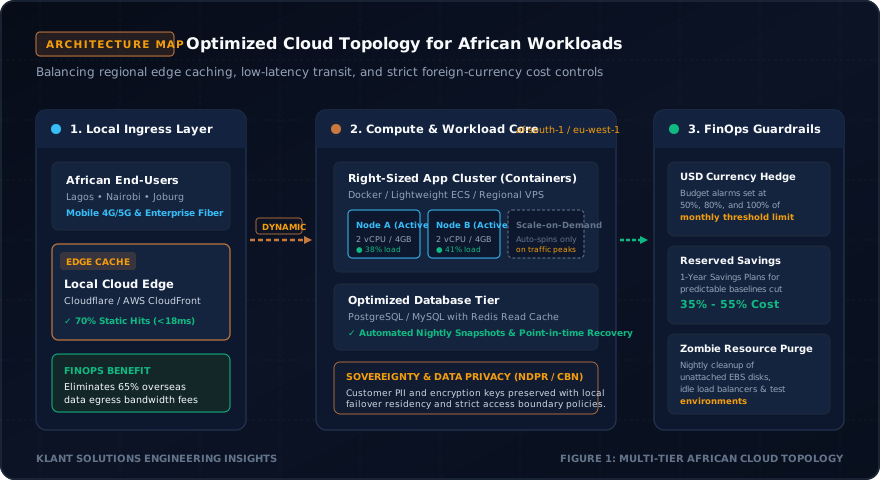
Technology architectures in Sub-Saharan Africa must treat infrastructure volatility, high-latency overseas routes, and rigorous local data sovereignty as design inputs rather than retrospective patches. Designing for local-first execution and cryptographic boundary protection ensures business continuity regardless of connectivity disruptions.
Do you really need AWS?
Do you really need Azure?
Do you need Kubernetes?
Do you need five servers?
Do you need a managed database that costs more than your entire application?
Maybe.
But maybe you don’t.
And this is exactly where many businesses make an expensive mistake.
They start with the cloud provider.
Instead of starting with the business.
They choose AWS because everyone talks about AWS.
They choose Azure because someone recommended Azure.
They choose a large database because they expect millions of customers.
They provision infrastructure for traffic they don’t have.
And then…
The monthly cloud bill arrives.
Suddenly, the business is paying hundreds or thousands of dollars every month for infrastructure that may only be using a fraction of its capacity.
That is not cloud optimisation.
That is simply expensive infrastructure.
A properly planned cloud environment should be designed around your users, your workload, your security requirements, your expected growth and your budget.
And for African businesses dealing with foreign-currency costs, connectivity considerations and different regulatory environments, that distinction can matter even more.
So…
Before you migrate to the cloud, let’s talk about how to do it properly.
What Is Cloud Migration?
Cloud migration is the process of moving an organisation’s applications, databases, data, infrastructure or other IT workloads from an existing environment into a cloud environment.
That existing environment might be:
- Physical servers
- An office data centre
- A traditional hosting provider
- A VPS
- Another cloud provider
- Legacy enterprise infrastructure
The destination could be:
- AWS
- Microsoft Azure
- Google Cloud
- DigitalOcean
- Hetzner
- Oracle Cloud Infrastructure
- A local or regional infrastructure provider
- A hybrid environment combining several options
But here’s the part businesses often miss:
Cloud migration does not mean “put everything on AWS.”
And it certainly does not mean:
“Use the biggest infrastructure available just in case we grow.”
Cloud migration is about finding the infrastructure model that makes sense for the business.
Why African Businesses Need a Different Cloud Conversation
A business in Lagos does not necessarily have the same requirements as a business in London.
A fintech processing regulated financial data does not have the same requirements as a small SaaS startup.
A university does not have the same workload as a telecom company.
And a company serving 5,000 users does not need the same infrastructure as one serving 5 million users.
Yet businesses sometimes approach cloud migration as if there is one standard architecture for everybody.
There isn’t.
African organisations may need to consider:
- Foreign-currency cloud bills
- Internet connectivity
- Regional latency
- Data governance
- Regulatory requirements
- Availability
- Disaster recovery
- Cybersecurity
- Internal technical skills
- Existing infrastructure
- Customer growth
- Budget constraints
Nigeria’s 2026 National Digital Cloud Policy also puts greater attention on cloud infrastructure, digital sovereignty, governance and the protection of government and regulated data.
The cloud strategy therefore needs to fit the environment in which the organisation actually operates.
The First Question Should NOT Be “Which Cloud Provider?”
This is important.
If someone asks:
“Should we use AWS or Azure?”
before asking about your application…
They are starting too early.
The first questions should be:
How many users do you have?
Where are your users located?
What does your application actually do?
How much traffic do you currently receive?
What growth do you realistically expect?
What data are you processing?
What uptime do you actually require?
What are your security requirements?
What regulatory requirements apply?
What is your monthly infrastructure budget?
Who will operate the environment after migration?
Those answers should influence the architecture.
Not the other way around.
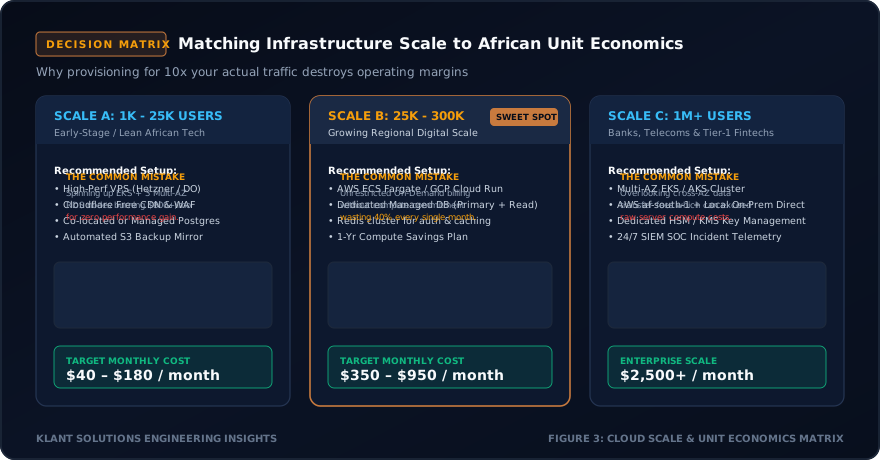
Your User Count Should Influence Your Cloud Architecture
Let’s make this practical.
Imagine three businesses.
Business A: 2,000 users
It is a new SaaS platform.
Most users are active during working hours.
The application has a relatively simple backend.
The business has a limited technology budget.
Do they need a complex multi-region Kubernetes architecture?
Probably not.
A simpler architecture could potentially provide everything they need.
Business B: 100,000 users
Now things change.
Traffic is higher.
There are more integrations.
The database is becoming important.
The company needs stronger monitoring and automated deployments.
Now you may need:
- Load balancing
- Auto-scaling
- Managed databases
- Caching
- Background workers
- Better observability
- Automated backups
- Stronger security controls
The architecture has to evolve with the workload.
Business C: 5 million+ users
Now we’re talking about a completely different problem.
High availability becomes more important.
Traffic patterns need to be understood.
Database architecture becomes critical.
Disaster recovery becomes more sophisticated.
You may need multiple availability zones, regional redundancy, sophisticated observability and carefully designed scaling mechanisms.
The point is simple.
Don’t buy infrastructure for the company you imagine becoming someday.
Design for the business you have today, with a controlled path to the business you expect to become.
Your Budget Should Influence the Architecture Too
Let’s talk about something many technology companies avoid discussing.
Budget.
If your business can comfortably spend $5,000 per month on infrastructure, your options are different from a startup with a $100 monthly infrastructure budget.
That’s okay.
The objective is not to make every business use the same technology.
The objective is to get the best business outcome from the available budget.
A smaller business might need:
- One or two application servers
- A modest database
- Object storage
- CDN
- Automated backups
- Monitoring
- CI/CD
A larger enterprise might need:
- Multiple environments
- Load balancers
- Redundant databases
- Multiple availability zones
- Private networking
- Centralised logging
- Security monitoring
- Disaster recovery
- Infrastructure-as-code
- Automated scaling
Different businesses. Different architectures.
AWS and Azure Are Powerful. But They Are Not Automatically the Cheapest Choice.
Let’s clear something up.
AWS and Microsoft Azure are extremely capable cloud platforms.
They support everything from small applications to large enterprise workloads.
AWS’s Well-Architected Framework explicitly includes cost optimisation as one of its core pillars and recommends understanding usage, selecting appropriate resources, managing demand and continuously optimising workloads.
Microsoft Azure similarly recommends cost-aware architecture, usage optimisation, rate optimisation, monitoring and continuous optimisation.
So the question isn’t:
“Is AWS expensive?”
or:
“Is Azure expensive?”
The better question is:
“Are we using the right services and resources for this workload?”
Because a badly designed AWS deployment can be expensive.
And a well-designed AWS deployment can be highly efficient.
The same is true for Azure.
What Are the Alternatives to AWS and Azure?
This is where an experienced cloud team can make a significant difference.
Depending on the workload, alternatives may include:
DigitalOcean
DigitalOcean can be attractive for teams that value relatively simple infrastructure and predictable virtual-machine-based deployments.
Its Droplets are Linux-based virtual machines, and the platform also provides networking, load balancing, storage and Kubernetes options. In 2026, DigitalOcean introduced per-second billing for Droplets, which can be useful for workloads such as CI/CD, short-lived compute and autoscaling scenarios.
Hetzner
Hetzner can be worth evaluating when raw compute cost is a major consideration and the organisation is comfortable with a more infrastructure-focused operating model.
For example, Hetzner’s published June 2026 pricing shows relatively low-cost cloud instances compared with many large hyperscaler configurations.
But cheap compute does not automatically mean cheaper infrastructure.
You still need to account for:
- Engineering time
- Backups
- Monitoring
- Security
- Networking
- Managed services
- Availability requirements
- Operational responsibility
Cheap servers can become expensive if nobody knows how to operate them properly.
Oracle Cloud Infrastructure
Oracle Cloud Infrastructure can also be relevant for particular workloads.
Oracle currently offers an Always Free tier containing selected compute, database, networking and storage resources, alongside its paid cloud services.
That can make it useful for certain development, proof-of-concept and small-scale workloads.
But again…
Free does not mean universally suitable.
Architecture, region availability, support requirements, operational complexity and workload characteristics still matter.
The Cheapest Cloud Is Not Always the Cheapest Solution
This is probably the most important section in this entire article.
Imagine:
Provider A
Compute: $50/month
Provider B
Compute: $80/month
Naturally, you choose Provider A.
But then you discover you need:
- More engineering work
- Additional backup infrastructure
- More networking configuration
- More monitoring
- More security tooling
- More manual maintenance
Suddenly your “cheap” infrastructure costs significantly more to operate.
Now imagine Provider B costs more for the server but provides managed services that reduce engineering effort.
Which one is cheaper?
You cannot answer that by looking at the server price alone.
You need to consider Total Cost of Ownership (TCO).
That includes:
Infrastructure cost + engineering time + operations + security + backup + monitoring + support + downtime risk.
That’s why cloud optimisation requires experts who understand both infrastructure and software.
This Is Where DevOps and Cloud Engineering Matter
You don’t save money simply by choosing a cheaper server.
You save money by designing the entire system properly.
A good DevOps or cloud engineering team can look at questions such as:
Is the server oversized?
Can workloads scale automatically?
Are development environments running 24/7 unnecessarily?
Are there unused volumes?
Are backups consuming unnecessary storage?
Is the database over-provisioned?
Can caching reduce compute requirements?
Can a managed service eliminate operational overhead?
Can containers improve resource utilisation?
Are we paying for unnecessary network traffic?
Can workloads be scheduled during specific periods?
Are our CI/CD resources being destroyed after use?
These are not theoretical questions.
AWS itself recommends right-sizing, monitoring usage, managing demand and using appropriate pricing models as part of cloud cost optimisation.
Microsoft similarly recommends optimising workloads, usage and rates as part of FinOps.
This is where expertise pays for itself.
You Don’t Need Kubernetes Just Because You’re a Serious Company
Let’s kill another misconception.
Kubernetes is powerful.
But Kubernetes also introduces complexity.
If your application consists of:
- One frontend
- One API
- One database
- A few thousand users
you may not need Kubernetes.
You could potentially operate effectively with a much simpler architecture.
Kubernetes becomes more compelling when you have requirements such as:
- Multiple services
- Complex deployment requirements
- Large-scale workloads
- Container orchestration
- Advanced scheduling
- Significant infrastructure automation
- Teams capable of operating the platform
Technology should solve a problem.
Don’t introduce operational complexity simply because the technology is popular.
The Same Principle Applies to Managed Databases
Managed databases can be excellent.
They can reduce operational work.
They can provide backups, monitoring, scaling options and other capabilities.
But…
You don’t necessarily need the largest database configuration available.
A database serving a startup with 3,000 active users should not automatically be designed like the database of a bank processing millions of transactions.
Start with the actual workload.
Monitor it.
Measure it.
Scale when the data tells you to scale.
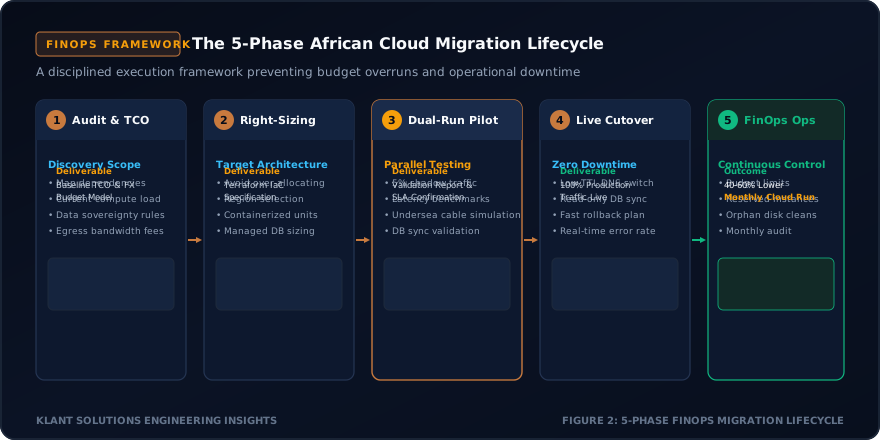
How Klant Can Approach Cloud Projects
This is where the difference between buying cloud infrastructure and working with a cloud engineering partner becomes clear.
At Klant Solutions, the approach should begin with:
Understand.
Then:
Assess.
Then:
Design.
Then:
Build.
Then:
Optimise.
Then:
Support.
Not:
“Here is your AWS account. Good luck.”
Step 1: Understand Your Business
Before touching infrastructure, we need to understand:
- Your business model
- Your customers
- Your users
- Your applications
- Your growth expectations
- Your critical operations
- Your budget
- Your security requirements
Because technology exists to serve the business.
Step 2: Audit Your Current Infrastructure
We look at what you already have.
That could include:
- Servers
- Applications
- Databases
- Storage
- Networking
- Domains
- APIs
- Security controls
- Backups
- Monitoring
- Existing cloud services
Then we identify unnecessary spending, bottlenecks and risks.
Step 3: Design Around Your Actual Workload
Now we choose the architecture.
Maybe that’s:
AWS.
Maybe:
Azure.
Maybe:
DigitalOcean.
Maybe:
Hetzner.
Maybe:
Oracle Cloud.
Maybe:
A hybrid environment.
Maybe:
A combination of managed services and dedicated infrastructure.
There is no prize for choosing the most expensive cloud.
There is no prize for choosing the cheapest server.
The objective is to choose the right architecture.
Step 4: Build for Security and Reliability
Cost optimisation should never mean:
“Remove every security control.”
That’s not optimisation.
That’s risk.
A properly designed environment should consider:
- Identity and access control
- Encryption
- Network security
- Backups
- Monitoring
- Logging
- Disaster recovery
- Vulnerability management
- Secrets management
- Incident response
Cheap infrastructure that exposes customer data is not cheap.
It is dangerous.
Step 5: Automate the Infrastructure
This is where DevOps becomes extremely valuable.
Instead of manually configuring servers every time…
Use automation.
Instead of manually deploying applications…
Use CI/CD.
Instead of manually checking whether services are healthy…
Use monitoring and alerts.
Instead of manually recreating infrastructure…
Use Infrastructure as Code where appropriate.
Automation reduces repetitive work.
And over time…
Less manual work can mean lower operational cost and fewer avoidable mistakes.
Step 6: Continuously Optimise Cloud Spending
Migration should not end when the application goes live.
It should become an ongoing process.
We monitor:
What are we paying for?
What are we actually using?
What is growing?
What is sitting idle?
Which resources are oversized?
Which workloads can scale down?
Which services can be consolidated?
Where are network costs increasing?
Is the infrastructure still appropriate for the business?
AWS describes cost optimisation as an ongoing discipline rather than a one-time activity.
Microsoft’s FinOps guidance similarly treats cloud cost management as a continuous process connecting technology spending with business value.
Your cloud bill should be reviewed just like any other major business expense.
A Practical Example: A Growing Nigerian SaaS Company
Let’s imagine a Nigerian SaaS company.
It currently has:
15,000 users.
Its team expects growth over the next two years.
Its monthly infrastructure budget is limited.
It needs:
- A web application
- API services
- PostgreSQL
- File storage
- Automated deployment
- Backups
- Monitoring
- HTTPS
- Basic disaster recovery
The wrong approach might be:
AWS + Kubernetes + multiple managed services + oversized database + multiple load balancers.
It sounds impressive.
But does the company need all of it?
Maybe not.
A cloud engineering team could instead assess the workload and design a simpler architecture.
Perhaps a combination of:
- Right-sized compute
- Managed or appropriately hosted PostgreSQL
- Object storage
- CDN
- Automated deployments
- Monitoring
- Scheduled backups
- Infrastructure automation
could meet the current requirements.
Then…
Scale the architecture when the business actually needs it.
That is what intelligent cloud engineering looks like.
What About a Bank or Fintech?
Now let’s change the scenario.
Suppose the organisation handles:
- Financial transactions
- Sensitive customer information
- Regulatory data
- High transaction volumes
The architecture changes.
Now you may need stronger controls around:
- Identity
- Network segmentation
- Encryption
- Logging
- Auditability
- High availability
- Disaster recovery
- Data governance
- Regulatory requirements
This is not the place to chase the cheapest server.
The architecture needs to balance cost, security, resilience and regulatory requirements.
That is why cloud optimisation is not simply about cutting the bill.
It is about getting more business value from every naira or dollar spent.
Cloud Migration Checklist for African Businesses
Before migrating, ask:
Business
- What problem are we trying to solve?
- What is our realistic infrastructure budget?
- How quickly do we expect to grow?
Users
- How many users do we have?
- Where are they located?
- When are they most active?
Application
- What workloads do we run?
- How much compute do they require?
- What are the traffic patterns?
- What systems depend on each other?
Data
- What data do we store?
- How sensitive is it?
- Where should it be stored?
- What backup and retention requirements apply?
Security
- Who needs access?
- How will access be controlled?
- How will we detect suspicious activity?
- How will we respond to an incident?
Cost
- What is the expected monthly cost?
- What happens if traffic doubles?
- What resources can scale automatically?
- How will unused resources be identified?
- Who reviews the cloud bill?
Operations
- Who will manage the environment?
- How will deployments work?
- How will monitoring work?
- How will disaster recovery work?
If you cannot answer these questions…
You probably aren’t ready to migrate yet.
The Goal Is Not the Cloud
This is where many cloud discussions go wrong.
The goal isn’t:
AWS.
The goal isn’t:
Azure.
The goal isn’t:
Kubernetes.
The goal isn’t:
having a modern-looking architecture diagram.
The goal is:
a secure, reliable and cost-efficient technology environment that helps your business operate and grow.
Sometimes that means AWS.
Sometimes Azure.
Sometimes another cloud provider.
Sometimes a hybrid architecture.
Sometimes a simple VPS is enough.
Good technology consulting means being honest about the difference.
Cloud Migration Should Be Designed Around Your Business
Your company shouldn’t have to pay for infrastructure it doesn’t need.
And you shouldn’t sacrifice security or reliability simply to reduce your cloud bill.
The right approach sits somewhere in the middle.
Understand the business.
Understand the users.
Understand the workload.
Understand the budget.
Design the architecture.
Automate what can be automated.
Secure what matters.
Monitor everything important.
Optimise continuously.
That’s how cloud becomes a business advantage rather than another expensive technology bill.
Ready to Reduce Your Cloud Costs?
If your organisation is planning a cloud migration, already running workloads in the cloud, or concerned that your infrastructure costs are growing faster than your business…
Don’t start by buying another server.
Start with an assessment.
Klant Solutions helps African businesses and institutions design, build and optimise practical technology environments around their actual business requirements.
Our approach can include:
- Cloud architecture
- Cloud migration
- DevOps
- Infrastructure automation
- Cloud security
- Cost optimisation
- Application modernisation
- Monitoring and observability
- IT consulting
- Ongoing infrastructure support
You may not need more infrastructure.
You may simply need better architecture.
Talk to the Klant Solutions team about your technology requirements and find out what your organisation actually needs before you spend more on cloud infrastructure.
Build intelligently. Scale confidently. Spend deliberately.